JARIA
Just another remarkably intelligent assistant
JARIA is Creator’s embodied AI module. It lets a Creator simulation host AI agents as virtual characters that can listen to a trainee, reason over configured knowledge, react to runtime scenario context, and answer with synchronized voice and subtitles.
Use JARIA for in-simulation guidance, procedural support, debriefing, and knowledge-grounded conversation. JARIA is the runtime embodied-agent pipeline; it is separate from AI Copilot, which helps authors inside the Creator editor.
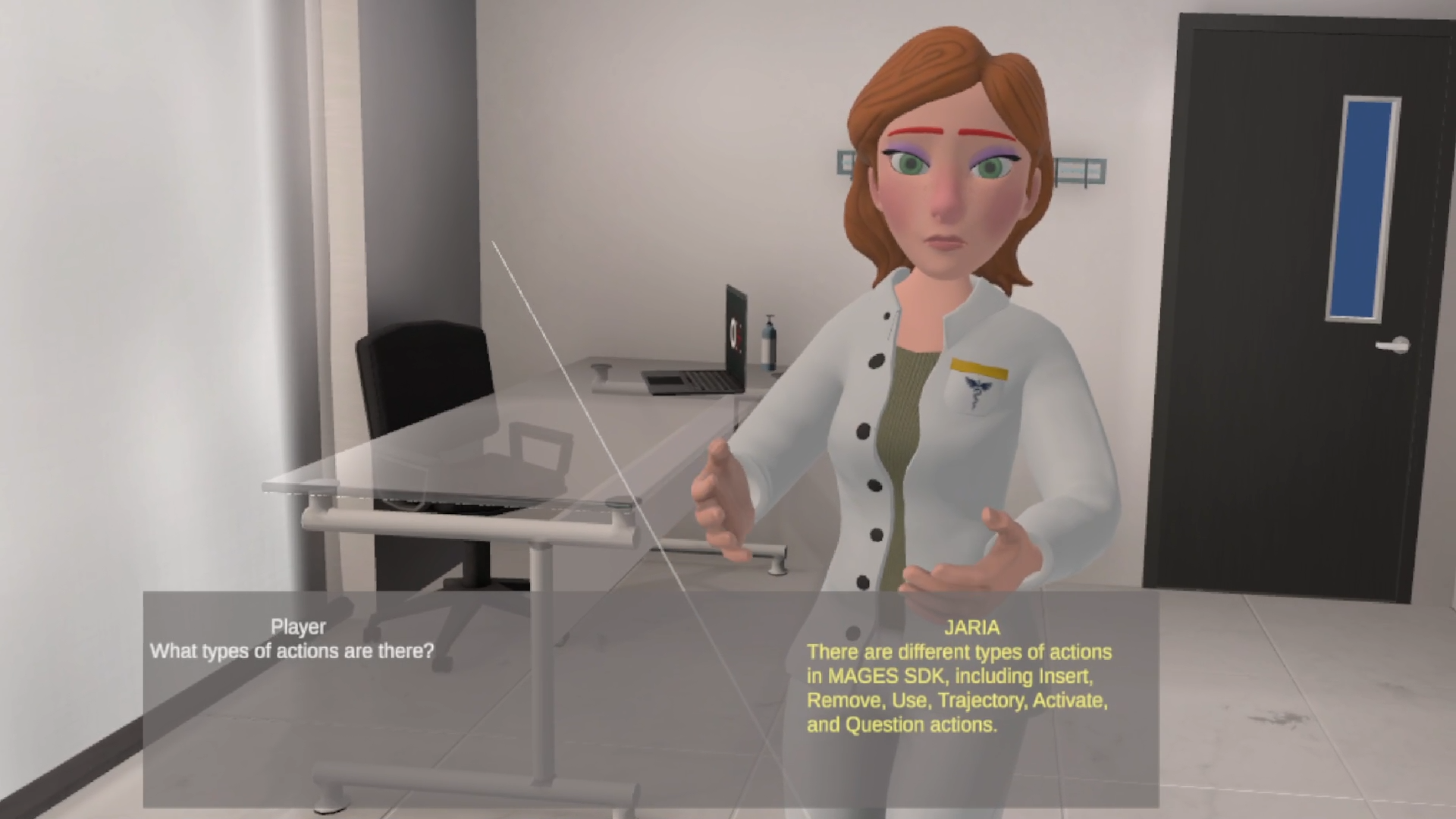
A JARIA agent in a simulation.
What the Trainee Experiences
From the trainee’s point of view, JARIA feels like speaking to a character inside the simulation. There is no typed prompt and no menu of canned answers.
When an agent is initialized, an interaction button appears above or near the character.
The trainee presses the button and speaks. Their recognized words appear as live subtitles while they talk.
The character thinks briefly, then answers aloud with synthesized speech and matching subtitles.
The trainee can continue the conversation or cancel it.
In cooperative sessions, other participants see when the character is occupied and receive the shared response.
The trainee does not configure the agent. Characters, voices, behavior modes, and knowledge sources are prepared by the author before runtime.
What the Module Provides
JARIA combines several runtime capabilities into one module:
Embodied AI characters that can be placed in a Creator simulation.
Voice-based trainee input through a speech recognition provider.
Spoken agent responses through a speech synthesis provider.
Subtitles for both trainee input and agent output.
Knowledge grounding through libraries created in the ORamaVR Portal.
Runtime context from Creator, such as the current action, next action, related objects, and analytics results.
Behavior modes for different training use cases, including specialist agents and routed multi-agent flows.
Cooperative-session synchronization for occupied state, cancellation, subtitles, and shared output.
Usage reporting for speech recognition, language-model usage, and speech synthesis when credit limits are active.
Architecture at a Glance
JARIA is split across Creator, the ORamaVR Portal, JARIA Cloud, and the agent reasoning services.
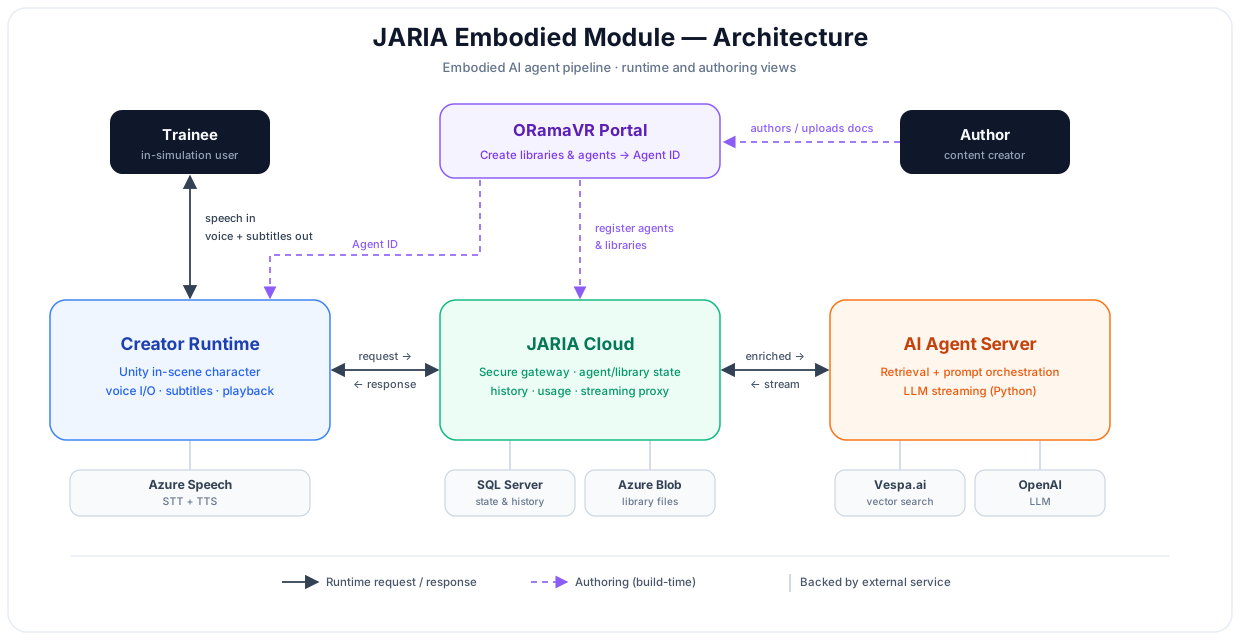
JARIA architecture across Creator, the ORamaVR Portal, JARIA Cloud, and the agent reasoning services.
Creator Unity Runtime
Creator owns the in-scene experience. It manages the virtual character, interaction buttons, microphone flow, subtitles, response audio, and runtime payloads from the running scenario. It can initialize configured agents by list index or Agent ID, clear conversation history when the first agent starts, and display usage information when limits apply.
ORamaVR Portal
The Portal is where authors prepare the data that powers agents. Authors create libraries from source documents, create agents with prompts and behavior modes, associate agents with libraries, and copy the resulting Agent ID into Creator.
JARIA Cloud
JARIA Cloud is the secure gateway between Creator and the agent reasoning services. It resolves agent metadata, library associations, specialist agent descriptions, conversation history, and usage limits before forwarding runtime requests.
Agent Reasoning Services
The reasoning services retrieve relevant knowledge from indexed libraries, combine it with the agent prompt, conversation history, and runtime payload, then stream the generated answer back through JARIA Cloud.
Runtime Request Flow
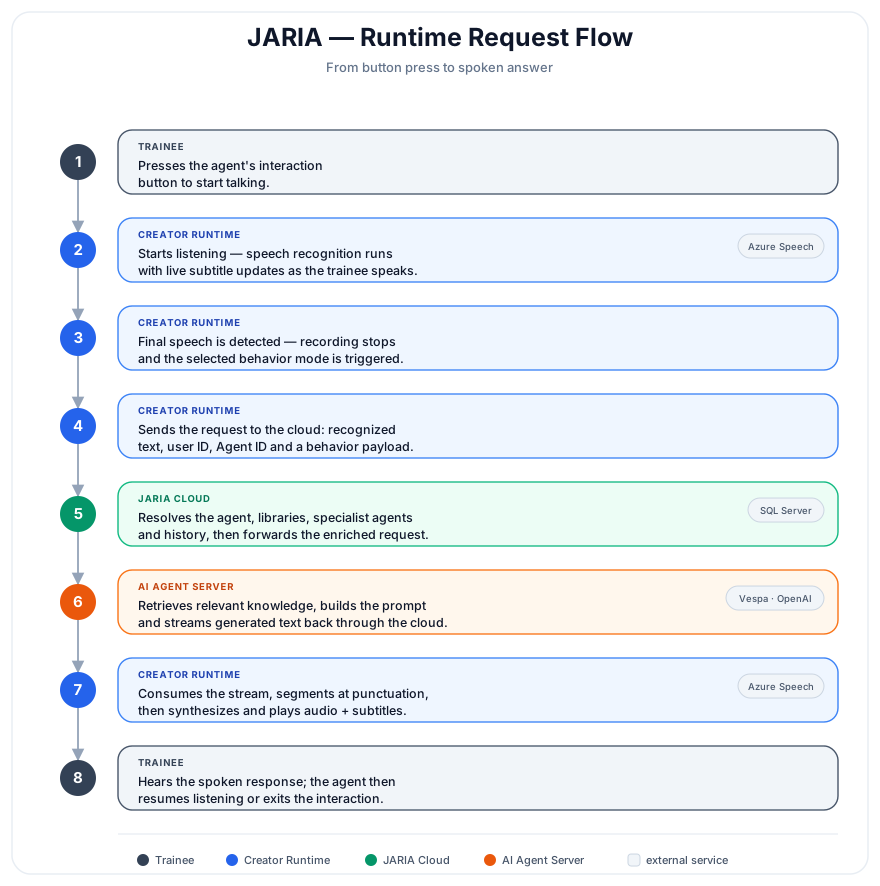
The runtime request flow from trainee speech to agent response playback.
The trainee presses the agent interaction button.
Creator enables speech recognition and shows the listening subtitle UI.
Partial speech recognition updates the trainee subtitle while they speak.
The final recognized speech triggers the selected agent behavior.
Creator sends the recognized text, active user identity when available, Agent ID, and behavior-specific payload to JARIA Cloud.
JARIA Cloud resolves the agent, associated libraries, specialist agents, conversation history, and usage settings.
The reasoning services retrieve relevant knowledge, prepare the prompt, and stream generated text.
Creator receives the stream, splits it into natural speech chunks, and sends each chunk to speech synthesis.
Synthesized audio chunks and subtitle chunks are queued together.
The character plays each audio chunk while the matching subtitle is displayed.
When playback ends, the agent either resumes listening or exits the interaction, depending on how it was started.
Authoring Flow

The authoring flow from Portal libraries to Creator runtime configuration.
Create a library in the ORamaVR Portal.
A library is a collection of documents that an agent can use as knowledge. Authors typically upload procedure documents, policy references, learning objectives, assessment rubrics, or text files that are relevant to the simulation.
Create the agent in the Portal.
An agent combines a role, prompt, behavior mode, and one or more libraries. The Portal returns an Agent ID, which links the Portal configuration to the Unity-side Creator configuration.
Configure the JARIA module in Creator.
A Creator project needs one JARIA module entry. The module contains shared subtitle UI and the list of configured agents available to the simulation.
Configure each Unity-side agent.
Each agent configuration defines the Portal Agent ID, character source, interaction UI, output UI, speech settings, behavior mode, and optional specialist agents.
Initialize the agent from the scenario.
The simulation should initialize the agent when it becomes relevant. For example, a tutor, assistant, or debriefing agent may appear during a specific scenario action. After initialization, the interaction button appears above or near the character.
For setup details, see Create an Agent in the Portal, Create the JARIA Module, Create a JARIA Agent, and Using an Agent.
Behavior Modes
The behavior mode determines what context Creator sends and how the agent should answer. A simulation can combine modes by using a router agent with specialist agents, or by running separate agents for separate tasks.
Router Agent
Use a router agent when one visible character should expose several specialist behaviors. The router receives the trainee request together with descriptions of the available specialists, chooses the best specialist, and forwards the correct payload.
General Knowledge Assistant
Use this mode for document-grounded conversation. It is best suited for procedure explanation, policy lookup, training guidance, and Q&A over the agent’s associated libraries.
The agent retrieves relevant passages from its libraries and uses them as grounding for the answer. This improves reliability, but it is not a guarantee: if the libraries do not cover the trainee’s question, the agent may not have enough evidence to answer accurately. Keep libraries focused on the agent’s intended topic.
State-Aware Assistant
Use this mode when the agent should explain where the trainee is in the current scenario. Creator sends scenario information such as the current action, action descriptions, related objects, and neighboring steps. The agent uses that context to answer in relation to the active simulation state.
Debriefing Assistant
Use this mode near the end of a scenario or after completion. Creator sends analytics context, such as triggered errors and operation results, so the agent can summarize performance and suggest improvements.
Gameplay Assistant
Use this mode when the agent should help the trainee complete the active step. A gameplay assistant can be triggered automatically during an action and grounded in the current action type, action name, and relevant scene objects.
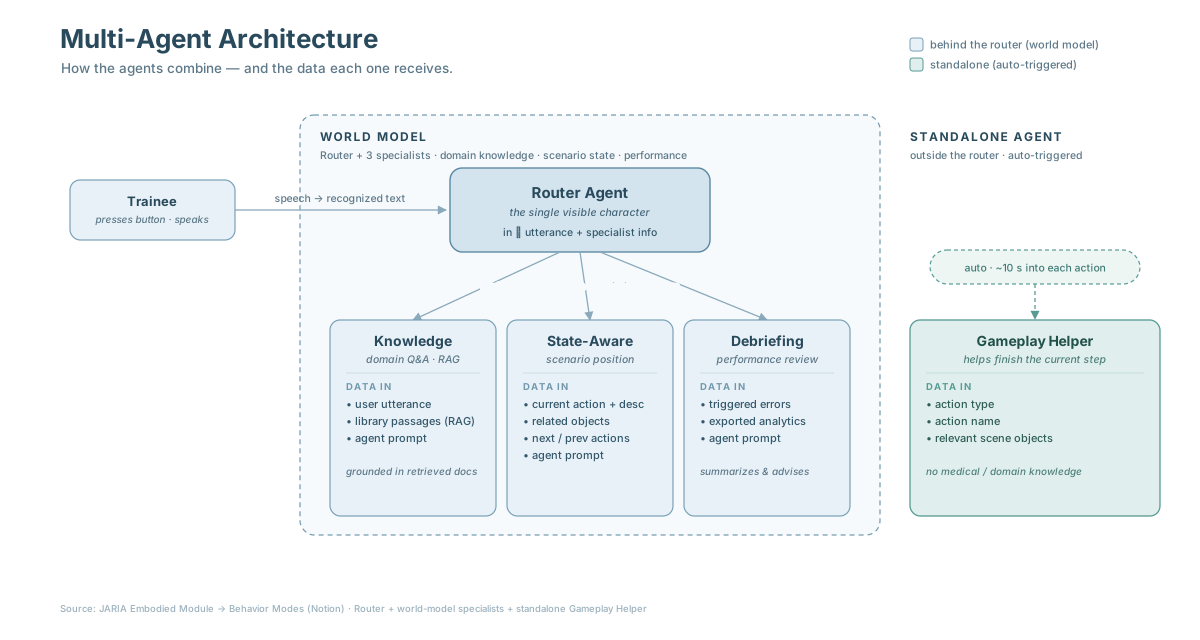
Example setup with a router, specialist agents, and a separate gameplay assistant.
Knowledge and Retrieval
Libraries are indexed by JARIA so agents can search them during runtime requests. During indexing, source documents are loaded, split into searchable chunks, and stored for retrieval. During an interaction, JARIA searches the libraries linked to the active agent and injects the most relevant content into the agent prompt.
Focused libraries produce better answers. A procedural tutor should use libraries for that specific procedure. A debriefing agent should use assessment rubrics, error definitions, and scenario-specific learning objectives. Broad, catch-all libraries usually make answers less reliable.
Runtime Context Payloads
Some behavior modes depend on scenario context from Creator. Depending on the configured behavior, the payload may include:
Current scenario action name, type, description, and related objects.
Previous or next scenario action details.
Analytics context, including triggered errors and operation results.
Specialist-agent payloads used by router-based flows.
For best results, scenario actions should have clear descriptions and meaningful object names. The quality of state-aware answers depends heavily on this context.
Speech and Subtitles
JARIA uses a speech recognition provider for trainee input and a speech synthesis provider for agent output. The current implementation is built around Azure Speech-compatible handlers.
A spoken conversation has three language layers that should be aligned:
Recognition language: what the trainee speaks.
Synthesis voice: the voice and language the character uses.
Language model output: the text generated by the agent.
Set the recognition language and a matching voice in each agent configuration. If these fields are left unset, the agent uses the speech provider’s defaults.
Speech recognition supports continuous recognition while the agent is listening, partial subtitle updates, final transcript events, optional language configuration, and optional custom speech endpoints for specialized vocabulary.
Speech synthesis supports configurable voices, queued audio chunks, matching subtitle chunks, cancellation, queue clearing, and cooperative session message synchronization.
Connectivity Requirements
JARIA is a cloud-based pipeline. Speech recognition, JARIA Cloud, knowledge retrieval, language-model generation, and speech synthesis all run as online services.
An active internet connection is required for every interaction.
Slow or unstable connections can delay or interrupt listening, streamed responses, speech synthesis, or subtitle synchronization.
Security and Data Notes
Before using JARIA with sensitive material, review how data flows through the pipeline.
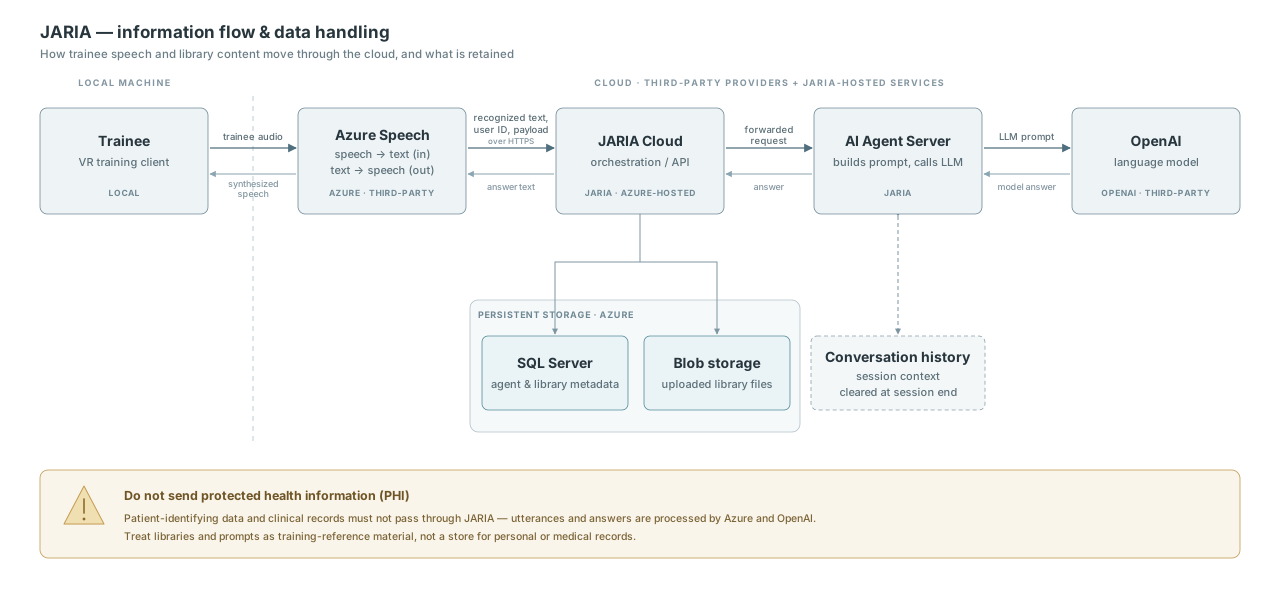
Data flow for speech, runtime requests, library content, model responses, and stored metadata.
Agent requests go through JARIA Cloud rather than directly to the reasoning services.
Creator sends the active user ID when a user session is available.
Trainee speech is processed by the configured speech recognition service.
Recognized text, Agent ID, user identity when available, and runtime context are sent to JARIA Cloud over HTTPS.
JARIA Cloud forwards the request to the reasoning services, which may use third-party language-model providers.
Agent answers are synthesized back to speech by the configured speech synthesis service.
JARIA Cloud stores agent metadata, library metadata, library files, usage accounting data, and conversation history needed for active interactions.
Conversation history is used to provide context across turns and is cleared when the session ends.
Warning
Do not place secrets, patient-identifying information, protected health data, or other regulated personal data in prompts, libraries, or trainee utterances unless your deployment, contracts, and privacy review explicitly allow it.
Troubleshooting
For common runtime issues and checks, see Troubleshooting JARIA Agents.