Suturing Action
Suturing Action is a SceneGraph action that lets you create one or more sutures between configured puncturable surfaces. The action listens for punctures on detector pairs, creates runtime suture joints when the needle passes through both sides, and completes after the knot is tightened.
Prerequisites
Before creating the action, make sure your scene already contains:
A Needle Actor that will drive the punctures.
A Mesh Deformations actor on each side you want to stitch together.
A Puncturable component on each stitched actor.
At least one observed triangle configured on each Puncturable component.
A transform that will act as the knot point.
Important
Each detector in a suture pair must have at least one observed triangle. The suturing runtime uses the first observed triangle of each detector to create the stitch.
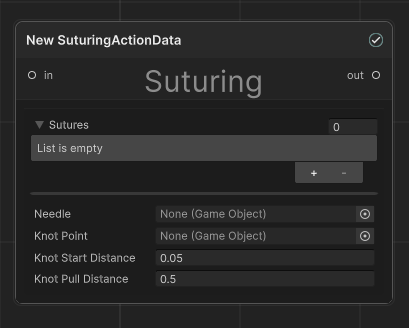
How To Set Up The Action
Configure the needle and puncturable targets.
Create and configure your Needle Actor first. Then add a Puncturable component to every actor that can participate in suturing and assign the same needle as its PuncturingActor.
Select the puncture areas.
For each Puncturable, configure the ObservedTriangles list so it marks the area that should be stitched. The action will only work if both sides of every suture pair have at least one observed triangle available.
Create a Suturing Action in the SceneGraph.
Add a new SceneGraph action of type Suturing Action and place it where you want the suturing step to happen in the procedure.
Add one or more suture pairs.
In the Sutures list, add an entry for each stitch you want to create. Every entry contains:
Side A Detector: the first puncturable detector that must be punctured.
Side B Detector: the second puncturable detector that must be punctured after side A.
If you configure multiple pairs, all of them must complete before knot tightening begins.
Assign the Needle and KnotPoint references.
Set Needle to the needle GameObject used for puncturing. Set KnotPoint to the transform that marks where the knot should start.
Tune the knot distances.
Set KnotStartDistance to the distance from the knot point at which the knotting phase starts. Set KnotPullDistance to the distance the needle must be pulled away from the knot point to fully tighten the sutures and complete the action.
Inspector Properties
Property |
Description |
|---|---|
Sutures |
A list of detector pairs to be stitched together. Each pair produces one runtime suture. |
Needle |
Reference to the needle GameObject used to puncture both sides of each pair. |
KnotPoint |
Reference to the transform used as the knot location. |
KnotStartDistance |
The distance threshold between the needle and the knot point that enables knot tightening. |
KnotPullDistance |
The pull distance used to tighten the knot from loose to fully closed. |
Runtime Flow
During runtime, the action behaves as follows:
The action subscribes to the OnPunctured event of every configured detector pair.
For each pair, the needle must puncture Side A first and Side B second.
After both punctures happen, the action creates a runtime suture object with distance joints between the two observed triangles.
Once all configured sutures have been created, move the needle close enough to the KnotPoint to enter the knotting phase.
Pull the needle away from the knot point until KnotPullDistance is reached.
When the knot is fully tightened, the action completes.
Note
If the action is skipped, the runtime completes all configured sutures immediately and tightens the knot automatically.
Usage Notes
If Needle is missing, the action cannot initialize.
If KnotPoint is missing, the action cannot initialize.
If a detector reference cannot be resolved, or if it does not contain a Puncturable component, the action will fail validation.
Each detector object must also have a BasePhysicsActor and a valid SimulationMesh through that actor.
The knot tightening phase does not begin until all configured suture pairs have been completed.